Know who to call today, and why.
Gardner is a territory call-prep and scratchpad utility for ETF, structured-product and UIT wholesalers. Your firm’s CRM and email remain your system of record. Gardner helps you prepare, and your prep notes stay on your own computer.
$1 a month for 3 months, then your plan’s price. Chrome or Edge, Windows or Mac.

Prospect
Every advisor has a stage and a check-in rhythm. Each morning the Reach out view lists who is due, which notes mature this month and which UITs are in their rollover window. Bring in a contact list from a spreadsheet or an export from your firm’s CRM in about a minute.
Retain
Set a projected value for each relationship and log funds as they arrive. Column totals show what is realized and what is still open, and prep notes stay with the advisor for the next call.
Advanced
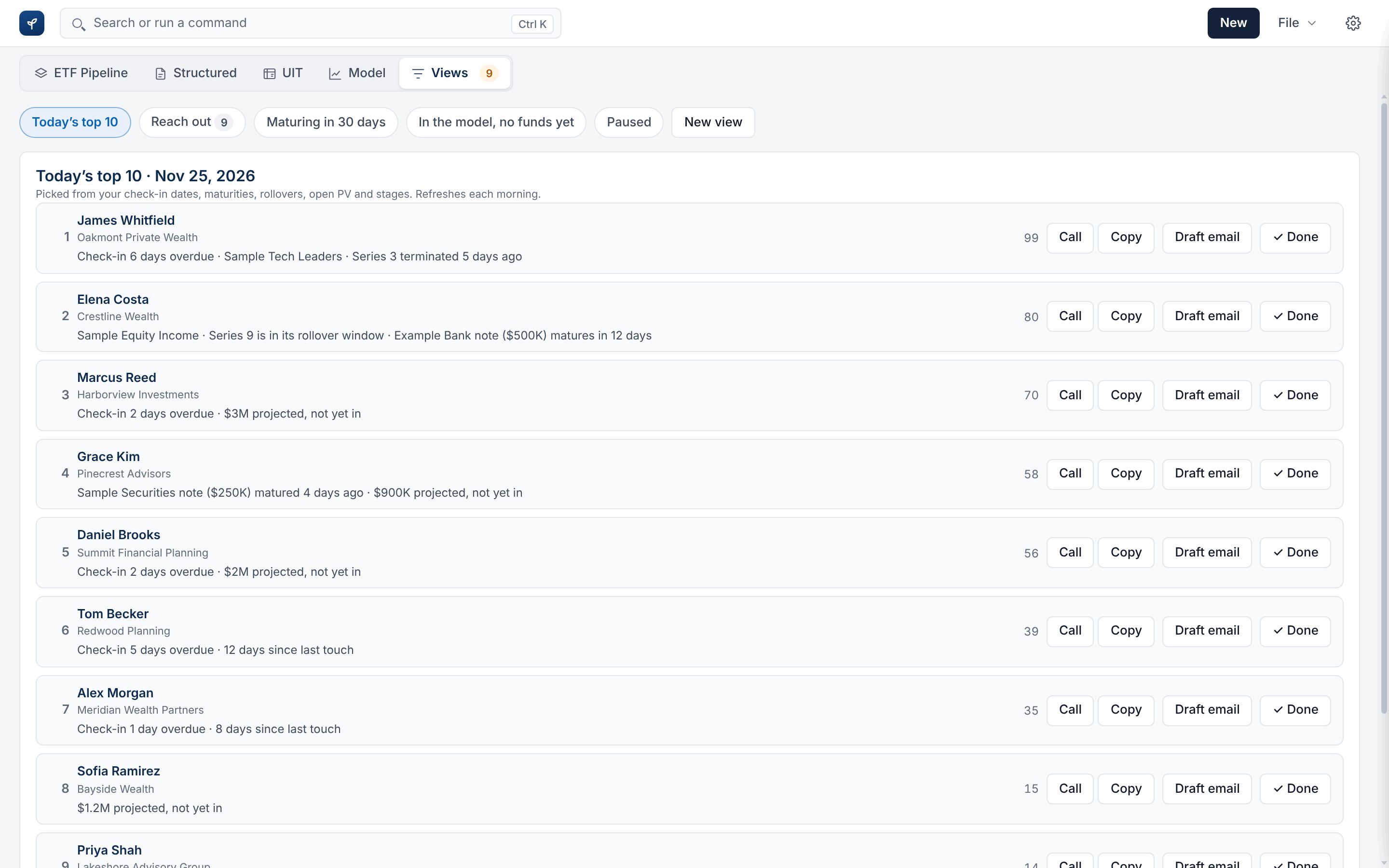
Each morning a top-10 list ranks your book from your own data: notes nearing maturity, UITs rolling, overdue check-ins and open projected value, with the reason for each. One click drafts the email in your own style, on your computer. It opens in your firm email (Outlook or Gmail), so your firm’s archiving and supervision apply. Gardner never sends email itself.
Private
Gardner runs in your browser and saves to a working file you keep. We never receive your prep notes. Licensing sends a name, an email and a computer code, nothing else. Data flow for compliance.
Pricing
Every plan starts with a 3-month trial at $1 a month, card required, then the plan’s full price. Cancel any time.
Monthly billing, cancel any time. Annual billing saves $49 on Basic, $118 on Pro, $238 on Advanced versus 12 monthly payments.
Dollars today are worth more than dollars later, so paying yearly costs less. Paying yearly saves $49 on Basic, $118 on Pro, $238 on Advanced versus 12 monthly payments.
Basic
Prep boards and notes for ETFs, UITs and structured products.
$1 a month for the first 3 months
What’s included
- ETF prep board with projected (PV) and actual (AV) value
- Structured-note and UIT boards with maturity and termination dates
- Prep notes and a funds log for every advisor
- Model tab: funds collected by month
- Import a contact list exported from your firm’s CRM (Salesforce, Dynamics, HubSpot) or from Excel
- Saves to a working file (CSV) you keep; it opens in Excel
- One click to call or copy any phone number
- No check-in reminders or reach-out list
Pro
Everything Gardner does today: reminders, reach-out list and views.
$1 a month for the first 3 months
What’s included
- Everything in Basic
- Check-in reminders on a rhythm you set for each advisor
- Reach out list each morning: who is due, notes maturing, UITs rolling
- Saved views, such as a Friday maturity run
- Weekly calendar reminder
Advanced
Pro, plus a ranked daily call list and email drafts in your voice.
$1 a month for the first 3 months
What’s included
- Everything in Pro
- Today’s top 10: a call list ranked from your own data each morning, with the reason for each
- Email drafts from your notes and dates, in your own writing style, written on your computer
- Drafts open in your firm email (Outlook or Gmail), so your firm’s archiving and supervision apply; Gardner never sends email itself
Team pricing: once an invite group (a subscriber and the coworkers they invited) has 5 or more paying members, everyone in it gets 20% off any plan at renewal.
For an office or team
Office license: up to 50 seats, $2,500/month or $30,000/year, invoiced to your firm.
One invoice to your firm and seats you assign. Prep notes stay private: client data stays on each person’s computer.Upgrading from Basic or Pro charges only the price difference for the rest of your current billing period, once, at the time you upgrade.
Cancel anytime; your access continues through the end of the period you paid for.
US dollars. Taxes may be added at checkout.
Questions
Does Gardner replace your firm’s CRM?
No. Your firm’s CRM and email remain your system of record. Gardner helps you prepare. It is a personal call-prep utility and scratchpad that sits alongside them and does not hold official books and records: it is where you plan the day, who to call, what is maturing or rolling, and how much of each relationship is realized.
How does the trial work?
Every plan starts with 3 months at $1 a month. You enter a card at Stripe checkout; after the third month the plan’s full price applies, monthly or yearly as you chose. Cancel any time before then and you will not be charged the full price. The $1 charges are final. One trial per person and computer. Want to look first? Try it in your browser.
Which plan do I need?
Basic gives you prep boards and notes for ETFs, UITs and structured products, without check-in reminders. Pro is the full Gardner: reminders, the morning Reach out list and saved views. Advanced adds a top-10 call list ranked from your own data each morning and email drafts in your own style. Open “What’s included” on each plan for the list.
What happens when I upgrade?
You pay only the price difference for the rest of your current billing period, charged once when you upgrade, and the new plan switches on right away. During the trial nothing extra is charged; the new plan’s price applies when the trial ends. Upgrade from Plan & billing in Gardner or from your account page.
Starting from a spreadsheet or your firm’s CRM?
Import a contact list in about a minute. Export contacts from your firm’s CRM (Salesforce, Dynamics, HubSpot) or Excel as CSV or .xlsx, then use File › Import contacts. Your firm’s CRM stays the system of record; the import only copies names and dates into your prep file. Gardner maps the columns, flags duplicates and can undo the whole import.
Where does my data live?
In your browser on your computer and in the working file (CSV) you save. End day saves the file before clearing this computer’s copy. In Chrome or Edge, live save writes every change to one file. Each saved file carries a fingerprint of the license it was made under, not your data, so a trial’s file stays with that trial.
Are the email drafts written by AI?
No. Advanced fills templates on your computer from your notes, check-in dates and maturities, and matches the greeting, sign-off, length and phrases of emails you paste in as samples. Gardner never sends email. The draft opens in your firm email (Outlook or Gmail), so your firm’s archiving and supervision apply when you send it.
How do updates work?
Every plan includes every update and new version. When one is ready, Gardner shows a small notice with what changed, at most once a day; download the new file and open your CSV. The update check sends none of your prep notes: it asks which version is current, and license checks send only your license code and computer code.
Can I invite coworkers?
Yes. Every subscriber has a personal invite link in Gardner (Settings › Share Gardner). A coworker who uses it starts with the same 3-month trial at $1 a month, then pays 10% less for life. For each coworker who becomes a paying subscriber you get one free month of your plan, and while 5 or more of them pay, your own plan is free. Team pricing: once an invite group (a subscriber and the coworkers they invited) has 5 or more paying members, everyone in it gets 20% off any plan at renewal. Rewards are account credit on your own Gardner subscription, not cash. If you are a registered representative, check your firm’s outside-activity policy before sharing.
Can I cancel, and are payments refundable?
Cancel anytime; your access continues through the end of the period you paid for. Cancelling stops future charges. Payments are non-refundable. The trial and the in-browser sandbox are the ways to evaluate Gardner before you pay full price.
Is Gardner approved by my firm?
Your firm’s compliance team decides. Gardner is independent software, not endorsed by or affiliated with any firm. Our data-flow summary is written for them.